Month: June 2026

  • Introducing Open AgentOS

    Almost every technological leap I’ve ever taken has been preceded by something Jon Udell articulated before I got there. Today is no exception:

    “I dislike the phrase “human in the loop” because it cedes authority to the machines. Let’s flip the narrative. It’s our loop, we work the same way we always have, now we recruit agents to join the team. An agent-assisted process need not be a black box that takes in prompts and emits features.” 

    It’s not just the idea of the shared experience with the loop or the concept of “visible workings”, it’s also the idea that we’re “recruiting agents to join the team”

    After proving out some ideas (see more here, here, here and here) around using GitHub as the shared workspace for building software with agents and managing my AI team, I’ve extracted and published the configuration as a re-usable framework. It’s called Open AgentOS:

    https://github.com/open-agentos/spec

    Why create a spec for an open agent OS?

    The software development that I enjoy most is when it’s a team sport. Solopreneuring is certainly exciting, too, but there’s nothing quite like leaning into a challenge with the people you trust and depend on every day, everyone knowing their role, fitting each other’s work together, and coming out the other side with something only you and your team could’ve done.

    Agents are becoming part of that dynamic, but it can create some friction. To carry on with the team sport analogy, you wouldn’t want to have a super talented member of the team skipping all the training sessions and team meetings. That player may help you score more points when they show up to the game, but the achievement is hollow and temporary, not a systemic change that builds a high functioning team that wins consistently.

    I want to know what my AI agents are doing and how they’re doing it. I want to see where problems might be forming in the system, what costs are accumulating, and where improvements can be made. It’s not hard to instrument current systems such as GitHub to report out the data that will show you what’s working and what’s not. It takes a few minutes to configure. 
    Once it’s setup the experience is a lot more like working with a team. You can think about what tools you want to recruit into your environment and integrate them without having to buy a whole new product or signup for a new service. It should just work the same way you’ve been working for the last several years. …but with some new players on your team. 

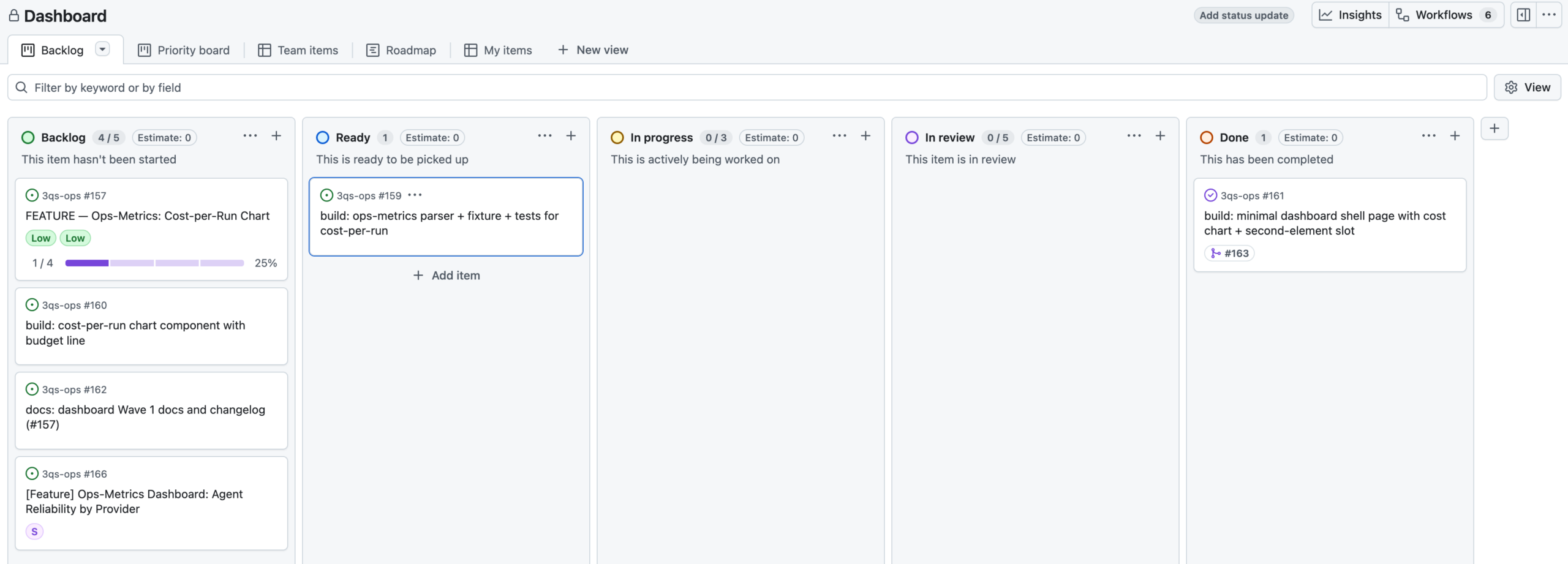
    The spec covers how Open AgentOS works in detail. In short, GitHub acts as an agent operating system. Issues are used to manage state and trigger different agents to contribute when called upon. You can look across your team of agents and their work using the Projects feature. And everything outputs raw receipts and detailed event data that you can use for analysis. 

    The system is designed with a few principles in mind around observability and agent accountability, and it is extensible so that you can bring your own agent and add your own plugins. It’s intended to operate with any stack so you can make it work however, wherever you want. 

    Anyone interested in joining the team here is more than welcome to contribute. I’d love to see some new capabilities around dashboards, non-github environments where this could also work, and plugins for other use cases and integrations. 

  • Hidden costs of agent loops

    In the race to build better agent loops it’s easy to ignore token waste as a problem. Getting an idea into a working state is so cheap and easy that the pressure to spend and compete far outweighs concerns about waste.

    Any project that gets past that initial implementation will need a reliable way of managing the way things get done, and that means knowing how much it costs. When you start counting your tokens against turns, tool calls, errors, failures and so on the waste can suddenly look pretty alarming.

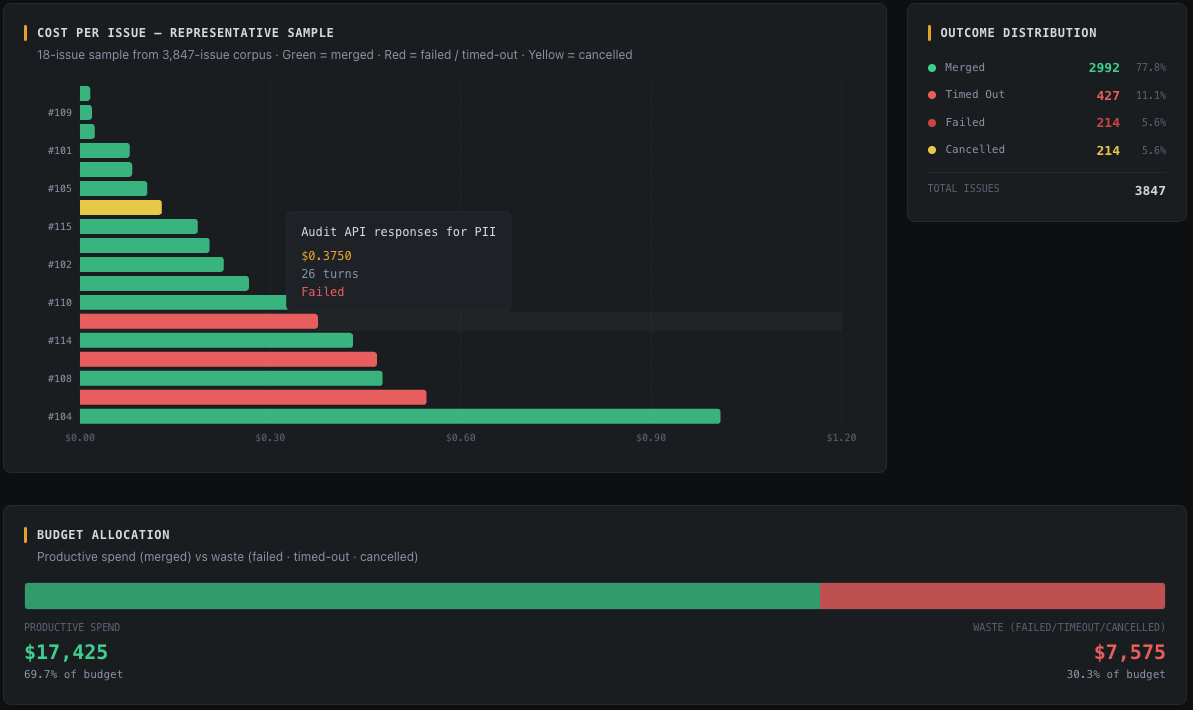
    While experimenting with using GitHub as an agent orchestration harness (1, 2, 3) I found that the blended cost per issue rate was reaching $3.43. Excluding the stalled issues, the rate is only $0.61 per issue. That seems much more reasonable, but is it realistic at a larger scale?

    Digging deeper, I found that the cheaper features change 1 file within 10+ turns, things like documentation updates. Some were operational runs that handled some issue or PR management work. In most cases, they were unnecessary or low impact. 

    The work where an issue adds or updates 2-3 files within 40-50 turns costs about $0.99 on average. Those issues were the ones that introduced capabilities like rate limit handling, generating scripts, writing tests, etc. 

    The problematic issues that killed my cost per issue rate were things that introduced change-requests during review or that hit an error and looped through changes to address it or that inflated the context early in the process. 43% of my total spend over a week went to these bad issues, so I’ve been implementing max_turns, max_attempts, token_count_warning and things like that.

    The magnitude of these cost per issue rates starts to become more meaningful when talking about more serious product development. Processing 10k issues at $3.50 per issue costing you $35,000 while knowing that you have wasted $25,000 of that pot on failures and errors would be very disappointing. Larger organizations running multiple projects with multiple teams would have to reconsider what they’re doing if those ratios remained that poor at scale.

    I only know all this because I’m instrumenting event traces that are logging token counts, turns, and outcomes, and running some lightweight analysis over the data. Otherwise I would be looking at my service provider dashboards and thinking, “Hey, the costs are looking pretty manageable.” The truth is that those costs are masking a lot of inefficiency. 

    Provider dashboards show you spend, not waste, and those are very different things.

    The context that makes cost data meaningful lives in the orchestration layer, not the API. If you’re not logging it there, you’re not managing your agent system. You’re just paying for it.

  • GitHub-as-AgentOS, Part 3: Feature layer oversight

    Missing from the agent loop discussion is the product view of the system doing the looping. Where is the insight into how a project is progressing? Anything happening above the agent loop level is the responsibility of an orchestrator function, but what does that workflow look like? How do you steer the orchestrator and monitor that the agent loops responding to it are achieving the larger goals of the project?

    After exploring ways to use GitHub-as-AgentOS (Part 1, Part 2) at the agent loop level, I figured the Project Board feature might solve this problem, and I think it does. It gives you something closer to a command center with a view across the work that is in play. 

    With webhooks triggering on issue label changes you can assign agents to do reviews and implement change requests and push code or whatever you allow them to do. GitHub Apps let you scope each agent’s identity and permissions independently, so a “reviewer agent” can’t accidentally merge, and a planner can’t push code. A “planner” agent can then spin up new sub-issues in a larger feature and label them appropriately to trigger getting the work done. 

    And here’s where it gets really useful from a higher level… the collection of issues for a feature can be monitored via a Kanban-style view or a Roadmap scheduling view. What are my agents working on right now? And I don’t mean “which tool call did they just make?”. I mean, “what is the status of my feature?” Are there a lot of issues to process? Which ones are done? Which are coming up next? Which are stuck? It can make it clear that, for example, three issues merged overnight but one got blocked and is awaiting a decision from the orchestrator agent.

    The tool stream data breadcrumbs that AI agents leave along the path from start-to-outcome can shine a light on things like which models are achieving the best balance between cost and result, indicators of token wastage, effects of pipeline changes, etc. That’s the foundational data this builds upon. 

    We can aggregate the data at the project level. That data may show that certain workflows give better outcomes for certain types of features. I can A/B test processes as well as models, such as a planning-led process with acceptance criteria or a short-burst implementation with code-cleanup agents or a documentation-heavy investigation informing a PRD and so on. 

    This feature-level observation layer over AI coding is starting to give me confidence as a product person that I can use agents to drive an outcome that has more moving parts and pieces. I trust it to build things, but without oversight of what’s actually happening and what’s been done and not done, it’s hard to trust it to build important things. GitHub-as-AgentOS is gradually proving to me that the solution is in the tools we already use every day.

  • GitHub-as-AgentOS, Part 2: Telemetry opens the black box

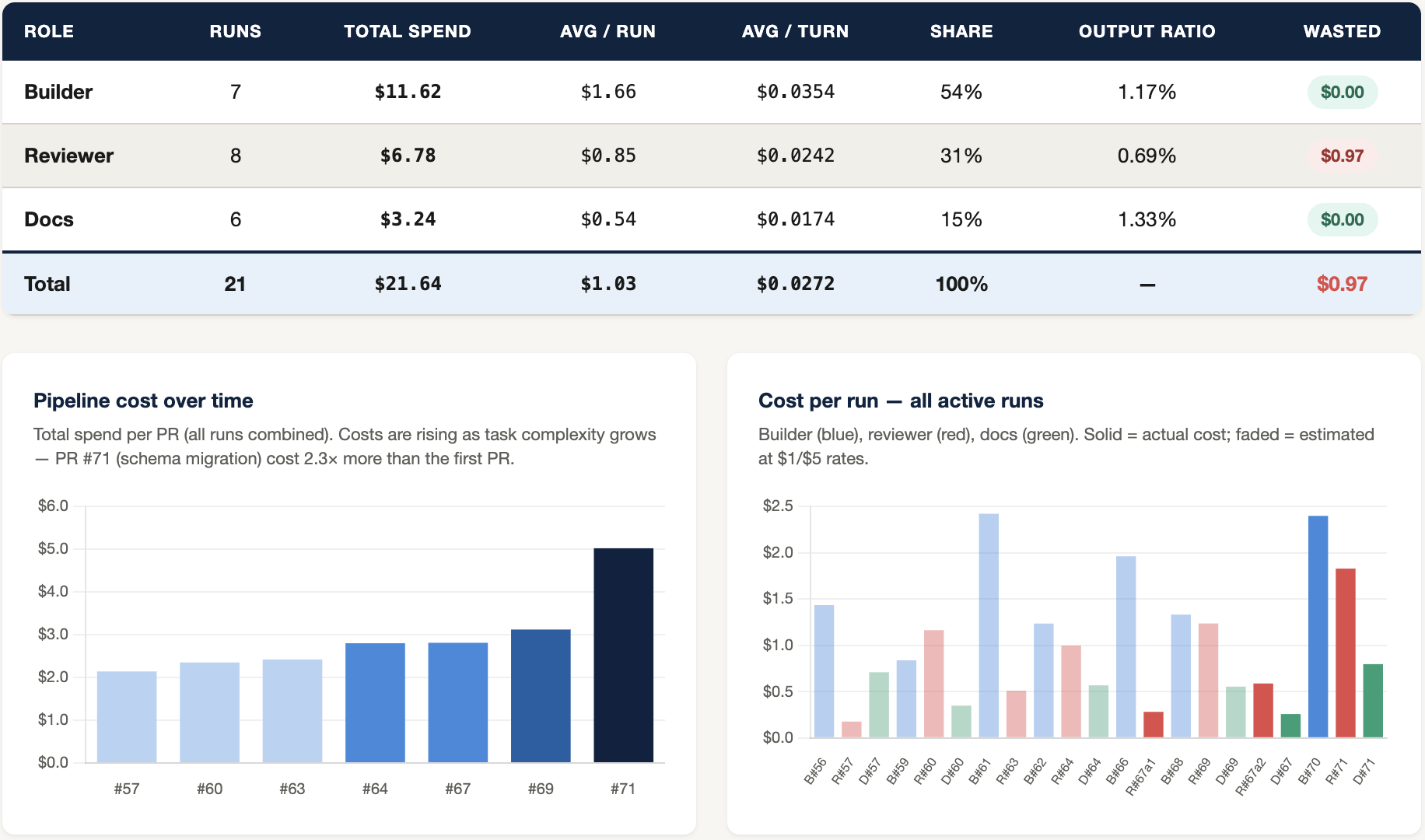
    GitHub-as-AgentOS opens a whole suite of analytics options that make it possible to steer the ship instead of just closing your eyes and hoping for the right outcome. By adding some event logging to the agents’ activities simple dashboards can be build for tracking things like cost per turn per agent, context inflation, pipeline cost over time, etc. 

    In my case, the dashboard pointed to a problem in the pipeline that no code review would’ve found.

    The reviewer agent was doing it’s thing, running through acceptance criteria, which is what it’s supposed to do, but the chart showed outsized token consumption vs what I would expect of it. The whole idea of the reviewer agent is that it shouldn’t need a huge amount of context to verify a file has changed as expected or that a script’s output is valid.

    I can also see what I don’t know.

    My reviewer is simply approving code or sending it back with change requests. I don’t know whether the quality of the code is good or whether the solution is sensible. Introducing some scoring and qualitative rubrics for my reviewer agent to use would give me a sense of how effective my builder agent is at solving certain problems. It could give me a sense of which LLMs are better for which types of challenges. In the future, it might be smart to introduce multiple builder agents per run. Then their solutions could be compared and graded before choosing which to merge down, feeding that knowledge back into the system so it learns.

    The insights are helping me to prioritize optimizations.

    The dashboard shows that context inflates more than 10x from the first turn to the last, and the problem is getting worse with each new issue. Digging into it further I can see that introducing compaction steps in the builder agent’s workflow could drop my costs for that agent by an estimated 30%, maybe more.  

    I might also introduce an escalation moment in any run that exceeds $2. When it hits the $2 threshold then it could stop and ping me for approval.

    There’s more work to do around running multiple issues simultaneously and adding more specialized agents with different properties in addition to the optimizations made obvious by the event traces. But the system is demonstrating that we can know what our agents are doing and improve them in measurable ways.

  • GitHub-as-AgentOS

    The characteristics of what I think everyone is referring to by the term “Agent OS” seem achievable through abstraction by configuring GitHub as a harness. In fact, much of the Zero Trust requirements as described by Anthropic come for free this way. And with all that’s on offer via the API much of the observability challenge shifts to analysis of the data.

    GitHub-native orchestration turns the agentic black box into a machine you can monitor and tune.

    This exploration started because I wanted to use LLMs to generate questions from some complex data, but I started worrying as much about the process of building with agents as I did about what I was building. So, I separated out the repos and went down the Agent OS rabbit hole in an “ops” repo. Here’s what it has become, so far:

    Agent OS FeatureGitHub / Git MappingImplementation
    System Clock & CPU InterruptsGitHub webhooksGitHub webhooks fire events to trigger the Hermes gateway, spawning containerized agent sessions on-demand.
    Task Queue & SchedulerIssues & LabelsThe orchestrator schedules work by creating GitHub Issues and labeling them (e.g., agent:builder, status:to-do).
    Memory Registers & StateLabelsIssue and PR labels (e.g., status:in-progress, status:approved, status:changes-requested) act as registers tracking the agent’s execution state machine.
    Inter-Process Communication (IPC)Pull Requests & CommentsAgents coordinate via GitHub’s social layer; the builder opens a PR, the reviewer reads the diff and comments, and the builder responds via follow-up commits.
    Workspace SandboxingGit BranchesBuilder agents are sandboxed on feature branches (e.g., agent/role/issue-num-slug) and cannot touch production directly.
    System Gates & Security PoliciesBranch Protection & PR MergingHuman orchestrators merge code only after the reviewer agent applies the status:approved label.
    System Registry / Living DocsLiving Markdown FilesFiles like CLAUDE.md and AGENTS.md serve as system configuration registers that agents automatically keep updated.
    Audit TrailGitHub Event LogEvery action (commit, comment, label change) is timestamped, attributed to a GitHub App, and permanently stored.
    Privilege IsolationGitHub App Scoped TokensEach agent role is a separate GitHub App with scoped API permissions, creating hard technical boundaries.
    Prompt Injection ContainmentPer-Agent Context ScopeDownstream agents operate on structured metadata rather than full context, isolating them from potential injection the builder encountered.
    Anomaly DetectionLabel State + TimestampsA stuck label state is detectable via the API; unexpected bursts of commits or label changes enable rule-based alerting.


    Several interesting outcomes from this approach became apparent.

    By using the Issue as the session storage record, data can be written down for use later, and, of course, GitHub’s GraphQL API makes it very easy to collect and do post-session analysis. Having a trajectory log (which agent acted, what label triggered it, what it did, what it commented, what it committed) that is actually readable and connects outputs to its actions gives me some confidence that I’ll be able to understand problems and instruct agents on how to address them rather than using a “Fix it” prompt that turns into a huge mess.

    The problem of starting a new agent session with all the insight needed without flooding it with context becomes more manageable which could make it possible to solve harder problems with smaller, cheaper models. Collaboration gets interesting too. For example, Memory could be shared with your team on a granular level, as in, per agent per repo per milestone, and, since it’s getting versioned, you can look back at how it evolved if you’re questioning a change to the Memory.

    Introducing some process determinism in a way that feels a bit more reliable than an AGENTS.md instruction is a good thing, too. Using labels for state management is not going to be flawless. It’s easy to misfire a webhook that then blocks the whole process and maybe it needs something more robust than a retry in the gateway, but the workflow or pipeline control you get with something so simple as a GitHub label as the trigger system is much easier for a normal person to understand. Plus, in a more serious development environment you can’t just rely on the output as the proof that the system itself is functioning properly, so, even if the pipeline with the webhooks seems fragile, getting event-level data that you can track is a much more robust architecture than the “wait-for-magic” mode some agent loop systems offer.

    The centralized orchestration ideas in many agent loop systems has merit, but I can’t see how that scales as well as scoping and managing process on a per-issue basis. If the issue documentation is clear about scope, acceptance criteria, test cases, etc., and if comments are clear about what each agent has done, then all subsequent engagements with an issue can just act on an as-needed basis using the shared context in the issue, triggering each other via the labels.

    I haven’t run any evaluations, but it won’t be hard to add a tool that collects enough data to analyze things like task completion rate, trajectory accuracy, step success rate, etc. That won’t help me understand failures of reasoning or poor choices, but it will help me see where those issues may or may not be occurring. The data will be in there. I just need to build the tooling that gets it and makes it usable. Then I can run some of the agent process evals suggested by Cameron Wolfe.

    The Zero Trust requirements can be managed well this way, too.

    Every action is a GitHub event (comment, commit, label change) timestamped, attributed to a specific GitHub App, and permanently stored, so you get a rich audit trail for free.

    Permission granting can be very granular and strictly controlled if each agent is a separate GitHub App with scoped tokens. The reviewer agent can be physically blocked from writing any code. Similarly, a builder agent can be physically blocked from merging a PR to main. It literally cannot call the merge endpoint. And by working in branches their work is safely sandboxed by default.

    Then subsequent agents in the workflow can check for alignment with the goals of the issue. They can identify problematic out-of-scope changes without requiring the context used by the builder agent. So, as long as they operate on the metadata, they are removed from any prompt injection other agents may have been exposed to which makes them a much safer agent-as-judge in the workflow.

    For now, consider this a thought experiment. The pieces are all working for the most part, and the early tests are promising. My motivation for sharing it now is to see if anyone is tackling the same problem the same way or if there are lessons already learned that would save me some time.